Notes on building AI products
Managing agents is managing context
1. From agents to context
Over the past year, single-task agents have shown that a model can use tools to finish a complex job, needing a person to watch each step less and less. Running several agents at once has become workable too. The person's place moves up with it, from doing the work to making decisions and accepting results.
Most multi-agent products, though, organise work the way a human team does: agents get names and roles, and channels, tickets and @-mentions connect them. The user is left in the middle: A's conclusion has to be copied to B, the background B needs has to be told again, and someone has to watch who has finished and who is stuck. How well one job goes depends on the model; how many jobs can move at once depends on a person's attention.
The early version of DSH-projects worked that way too. Every project was a group chat, and a project assistant created roles as needed, each with a name, a persona of a sentence or two and an avatar of its own. By 12 November, 18 roles had been created across 12 projects. In the code, though, a role contributed only three things: a name, a persona and a default model. Sessions were opened per task, not per role. What the model saw each time was the context of the job; the role was a label stuck on top.
So I removed the role layer. A project now has one executor, and the interface shows the model it runs on. The judgment behind it: an agent is a piece of context plus a model, and managing agents is managing context. The design question becomes: for each model call, what does the model see, who maintains that context, and what does it cost to assemble?
Around that question, DSH-projects has five goals:
- Verbatim: what the user says reaches the working model word for word, with no paraphrase in between.
- Isolated: each job has its own context and doesn't carry the history of other jobs.
- Stable: context is only appended at the end, so the prefix stays the same and the cache can be reused.
- Self-arriving: context comes in from the screen, messages and files by itself, instead of being fed by the user.
- Quiet: the user is called on only for decisions and acceptance.
The figure below shows the overall structure. The context pack is section 2, assembly and caching section 3, collection section 4, and the board section 5.
2. The context pack
The context of a job should be both clean and verbatim. The two common approaches each get one half:
- Subagents: each subagent gets a clean context, but what is in it is a description written by the parent, and what comes back is the last message. Every pass compresses once more, and the receiver guesses once more. I compared the source of 8 open-source multi-agent implementations: none shares a context window, and the default everywhere is "a description in, the last message out".
- Fork: the new branch carries the whole history of the main conversation, with no paraphrase, but also with nothing trimmed. The longer the main conversation, the more it carries; past a point it has to be compacted, and compaction is lossy.
DSH-projects takes both halves: a separate context for each job, with the words in it unchanged. This context is the context pack. It is organised per task (thread) and has four parts:
- Goal and background: the description the project assistant writes when it opens the task.
- The user's own words: the message cited when the task was opened, passed to the executor by the server as written.
- What counts as done: a checklist the executor writes when it starts, ticked item by item on delivery.
- Progress and outputs: deliveries, questions and failures are recorded on the task; files go into the project's shared folder and only paths are passed.
The user only has to make three things clear: what to do, where the context is, and what the standard is. In "Using the job description, write a second-round interview set, interview.md: 3 questions on motion and interaction detail, each with scoring points", all three are in one sentence. How many tasks to split it into, and what each one carries, is up to the project assistant.
The context pack is the thing maintained over time. The session that works on it is disposable: the pack is injected when work starts and written back when there is progress.
2.1 Quoted handoffs
The personal assistant doesn't work inside projects. What the user asks for in the personal conversation, it hands to a project, and this is the step most likely to distort. In an earlier implementation the assistant rewrote the user's request in its own words and added a few requirements the user had never stated, and the project carried out the rewrite as the user's own words (numbers in section 6).
Now a handoff accepts only a quote. The quote must be text from the user's message, the platform checks it character by character, and a handoff that fails the check is refused. Anything the assistant wants to add goes into a separate note, marked as the personal assistant's addition, and doesn't count as the user's request. When the project assistant opens the task, it cites that quote.
2.2 Trust labels
Every item in the context carries its source and a trust level. What the user types in a conversation is principal and carries a random nonce for this instance; only items with the right nonce count as the user. What assistants relay to each other is relay. What is observed in Feishu, on screen or on the web is external: material, never an instruction.
Whose words count as authorisation, whether a quote is really in the original message, and whether the same thing has already been raised are decided by code. The model only interprets.
2.3 Swappable executors
The executor is a DeepSeek Harness session by default and can be switched to Claude Code or Codex per task. On a switch, the new executor receives the record on the task plus handoff facts counted by the platform: how many messages, how many from the user, how many turns, and, when the working folder is a Git repository, which files changed. Code computes these numbers; the model doesn't report them about itself. A switch takes effect only after a turn ends, and reasoning in progress is not migrated.
3. Assembling context, and the cache
Every time an executor is woken, its context has to be assembled again. Model services cache the prefix they have already read: if this prefix matches the last one, the prefill can be reused and costs less; if anything in the prefix changes, everything after it has to be computed again. So the rule for assembling is: what doesn't change goes first, and what changes is only appended at the end.
In DSH-projects this comes down to three rules:
- The role instructions are frozen when a session starts and don't change for the life of the session.
- New events don't rewrite earlier content. Only a short wake notice is appended at the end: how many unread items are waiting and where from. The model fetches the content itself with a tool, and fetched items count as read.
- The same job continues in the same session. When project settings change, a new session is started, because the old one has the old settings frozen in its prefix. When an executor is switched from Claude Code back to DeepSeek Harness, the earlier session is resumed if the project settings haven't changed in between.
Content that changes over a conversation, such as "About you", is appended as runtime context and is never mixed into the user's messages.
The cache reads actually measured are in section 6.
4. Collecting context
For the AI to take over the layer of organising context, it first has to know enough. DSH-projects collects from three sources, all read-only:
- Screen: through Screenpipe on the user's machine, every window seen is read once a minute, text only, at most 3,000 characters per window. Screenshots never leave the machine.
- Feishu: messages are read every 2 minutes.
- Files: a small program on the computer connects out to DSH-projects and reads files on demand. The computer side decides what may be read: chosen folders, or the whole home folder minus Library and hidden folders. Browser cookies, saved logins and similar files are always refused.
Raw records are written to storage, not into the window. Every 10 minutes a window is cut and handed, with the previous activity and the project list, to one small-model call, which writes 0 to 3 activities in the user's own task wording. An activity gets a project only when it clearly belongs to one; otherwise the field stays empty. Code checks the source of every activity: it must point back to raw records in that window, and anything that can't is dropped. Raw records whose window path lies inside a project's folder are filed under that project by path.
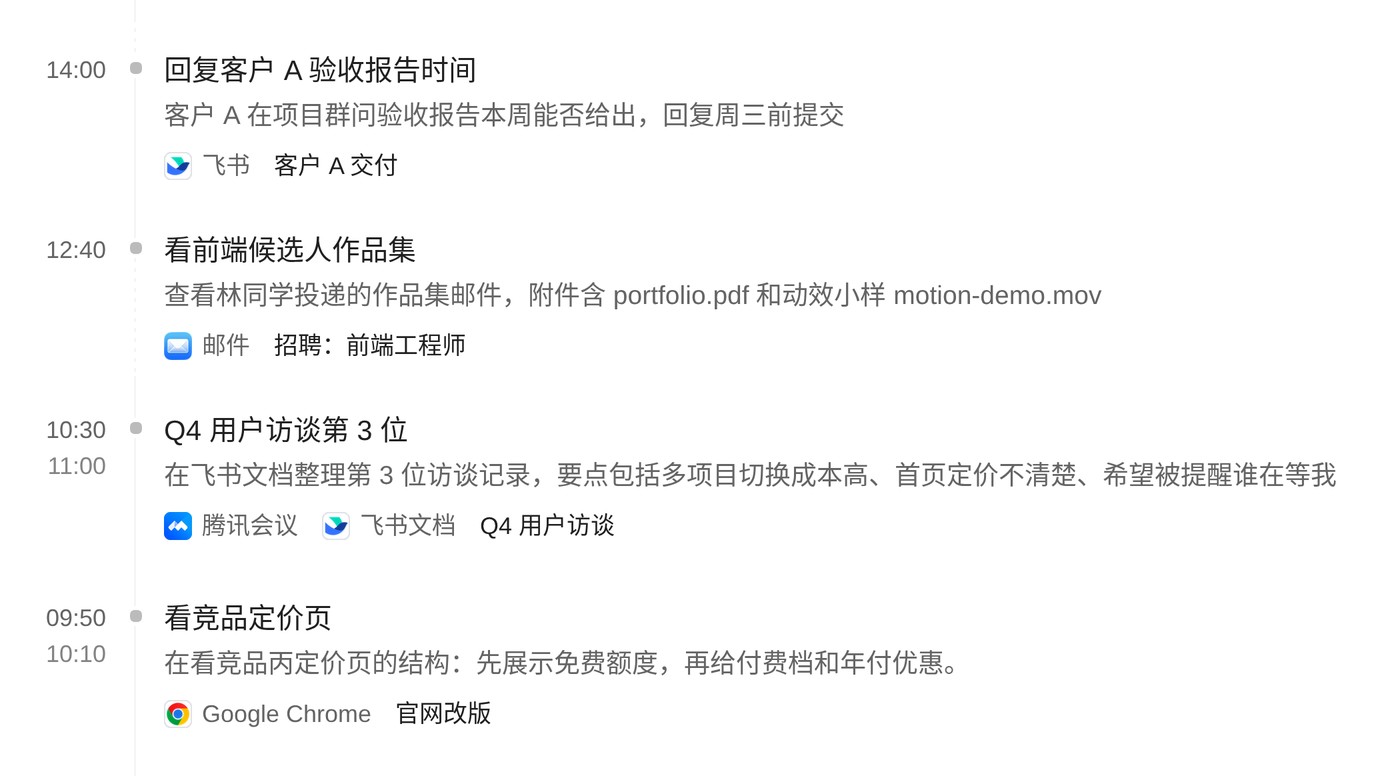
The timeline is read only by the personal assistant, and every entry can be checked against its source with a tool. When the personal assistant hands a job to a project, what goes across is the user's own words; the timeline and memory go along only as references with their sources.
Screen capture itself is nothing new. Screenpipe, AirJelly, Littlebird and the Computer History in Codex all do it, and they mostly stop at recording and search. The extra step in DSH-projects is connecting the collected context to tasks: proposing work from what it observed, handing it to a project, and bringing the result back to the board for the user's call.
5. Interaction with people
5.1 Waiting on you
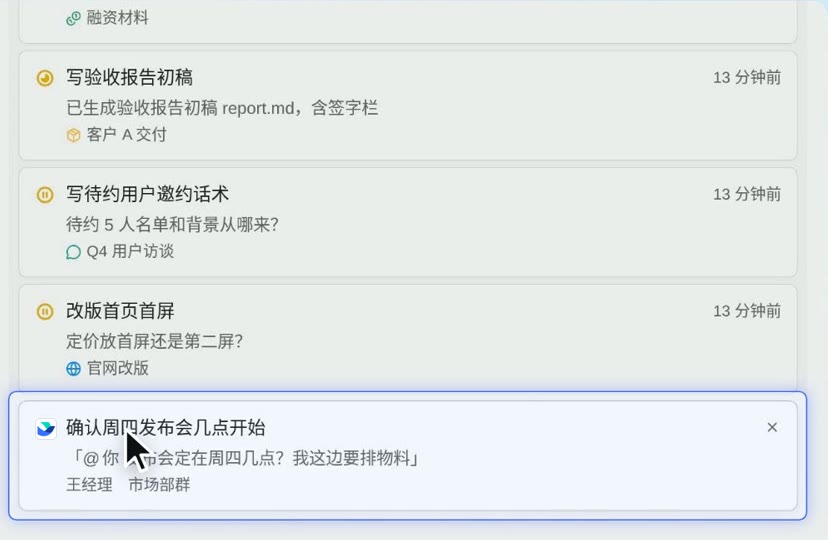
Once several jobs run in parallel, a person's attention is the bottleneck. DSH-projects gathers what needs the user onto one board across projects, with three lanes: waiting on you, in progress, done today. The first lane holds four kinds of items only: decisions, acceptances, failures, and messages someone is waiting on (a direct message or @-mention in Feishu that has gone unanswered for half an hour).
Cards have no buttons. Clicking a task card opens the task; clicking a reminder card drafts a sentence in the composer, which the user edits and sends. Every action ends up as a sentence the user says, so it takes the same path as ordinary conversation and the user's own words are kept.
5.2 What counts as done
Whether a job is done and whether something is still running are separate questions. Queued must not pass for running, and the end of a turn is not the end of a job. A job is done only after the user accepts it; actions such as merging code require a quote of the user's acceptance of this delivery, or the user clicking Accept themselves.
5.3 The night review
The personal assistant observes across tasks and doesn't work inside projects. At night, when the computer is idle, it reviews the day and leaves up to three cards for the morning: one thing that could be started, one thing worth a look and one remark, each with its source. One click drafts a sentence into the composer, and the work goes to a project only after the user sends it.
5.4 Memory and working instructions
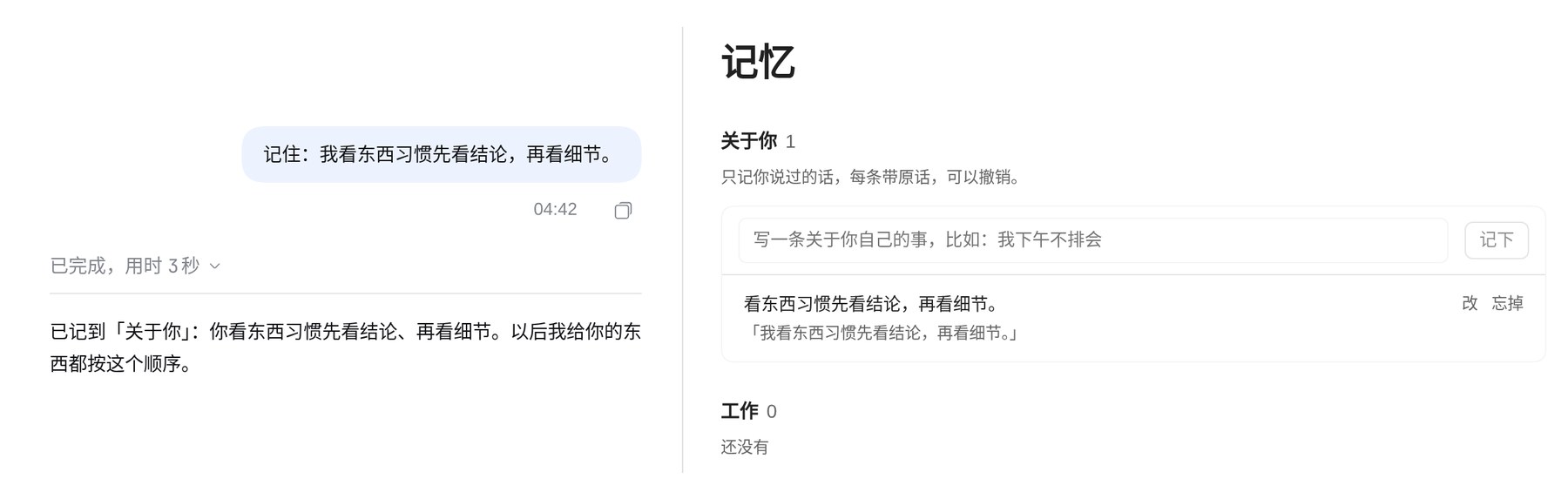
"About you" records only what the user said themselves: when the user explicitly asks it to remember something, or when, after a conversation goes quiet, the platform picks lasting preferences out of what the user typed. Each item carries the original words, and code checks that they really come from that message. What the user asks it to forget is not recorded again.
An executor's working instructions don't need configuring by the user. When the user raises the same problem after delivery three times, it drafts new working instructions overnight. The draft changes only how the work is done and adds no permissions; in the morning the user chooses to adopt it, try it once, or keep the old version.
6. Preliminary numbers
The numbers below come from a few runs on one machine and are only a reference.
6.1 Distortion in handoffs
On a fresh install, the same sentence asking for two pieces of work took three paths, with DeepSeek V4.1 Flash as the model:
| Path | Tasks opened | First delivery |
|---|---|---|
| Said directly to the project (1 run) | 16 s, two tasks, each with the user's words | 48 s |
| Handed on by the personal assistant, rewritten (1 run) | 27 s, one combined task, without the user's words | 11.6 min |
| Handed on by the personal assistant, quoted (3 runs) | 19 to 27 s, two tasks, each with the user's words | 62 to 103 s |
The delay of the rewritten path comes mostly from the rewrite itself: the assistant expanded the request, and the project merged the two pieces of work into one and worked to the expanded scope. With quoting, the handoff path behaves close to saying it directly to the project.
6.2 Cache reads
From all session records on this machine, where every model call records the prompt tokens read from the cache:
| Sessions | Model calls | Read from cache (all) | Read from cache (last 3 days) |
|---|---|---|---|
| Projects and tasks | 7,652 | 98.6% | 93.6% |
| Personal assistant | 970 | 94.7% | 86.9% |
Both kinds of session have dropped over the last three days, and the cause hasn't been found yet.
7. Open questions
- Who creates projects: tasks are split by the AI, but projects are created only when the user asks. Whether the AI should propose new projects, and how far, is still open.
- Timeline accuracy: neighbouring windows can be pulled along by the one before and written up as the same activity. The raw records are kept, but a person has to notice.
- Switching executors: a switch takes effect only after a turn ends, and there is no good answer yet for handing over mid-run. Claude Code and Codex run as executors without permission prompts and without a sandbox; Codex hasn't yet been verified through a complete task.
- Assembly and caching: the cache read ratio has been falling lately, and how best to assemble the context at each start needs more data.
- Contamination and injection: the more context is collected, the more protection it needs against contamination and prompt injection. Trust labels are a first step; real use will show whether they are enough.
- Feedback: feedback still depends mostly on people, and which steps can go to automatic checks is still being tried.
8. Closing
Looking back, what DSH-projects does fits in one sentence: remove the agent layer, organise context per task, and have people appear only to make the call and accept the result. Executors can be swapped, models can be swapped, and what stays is the context of each job.
The assistant that is always there is called Tacit by default, after tacit knowledge: what can't quite be put into words and keeps working anyway. I want it to know the background of a job before the user opens their mouth.
DSH-projects is an open-source plugin for DeepSeek Harness. The code is on GitHub, under the MIT license.